Cloud OCR Software for Enterprises: How Modern SaaS OCR Platforms Transform Document Workflows at Scale
Cloud OCR Software for Enterprises
Digital transformation projects often stall in one surprisingly stubborn area: documents.
Invoices still arrive as PDFs. Contracts come through email attachments. Purchase orders are scanned images. Compliance records live inside file cabinets and disconnected storage systems. Even organizations with mature cloud infrastructure frequently struggle with document extraction, indexing, and workflow automation.
That’s where cloud OCR software has become strategically important.
Modern enterprises no longer view OCR as a simple text-recognition tool. Today’s SaaS OCR platforms sit at the center of broader automation initiatives involving AI workflows, enterprise content management, compliance operations, customer onboarding, and intelligent document processing.
For CIOs and IT leaders, the conversation has shifted from “Can OCR read scanned documents?” to more operational questions:
- Can the platform integrate with ERP systems?
- Does it support multi-region compliance?
- How secure is the OCR processing pipeline?
- Can it automate exception handling?
- Will it scale across departments globally?
- How accurate is extraction for unstructured documents?
Those questions matter because enterprise OCR is no longer a back-office utility. It’s now part of enterprise AI infrastructure.
What Cloud OCR Software Actually Means
Cloud OCR software uses cloud infrastructure to process, analyze, classify, and extract text from documents through optical character recognition technology.
Unlike legacy desktop OCR tools, enterprise-grade cloud OCR platforms typically include:
- AI-powered document recognition
- API-based integrations
- Workflow automation
- Scalable cloud compute
- Centralized document management
- Role-based security controls
- Machine learning models
- Multi-language recognition
- Real-time document ingestion
The “cloud” component matters because enterprises need elasticity. Document volumes fluctuate constantly. Finance departments might process millions of invoices quarterly, while healthcare providers handle massive intake spikes during enrollment periods.
Cloud-native OCR systems scale dynamically without requiring organizations to maintain expensive local infrastructure.
This SaaS delivery model also changes procurement and deployment cycles. Instead of purchasing perpetual licenses and maintaining servers internally, organizations can deploy secure OCR SaaS environments faster and integrate them into existing enterprise ecosystems.
How AI-Powered OCR Differs From Traditional OCR
Older OCR engines focused mainly on character recognition. They converted scanned text into machine-readable formats but struggled with:
- Handwriting
- Poor scan quality
- Complex layouts
- Tables
- Multi-column documents
- Mixed languages
- Semi-structured forms
Modern AI cloud automation platforms go much further.
They combine OCR with:
- Natural language processing (NLP)
- Computer vision
- Document classification
- Entity extraction
- Predictive workflow routing
- Machine learning models
That distinction is critical for enterprise operations.
For example, a traditional OCR engine might recognize invoice text correctly but fail to identify:
- vendor names
- payment terms
- tax IDs
- line-item relationships
- duplicate invoices
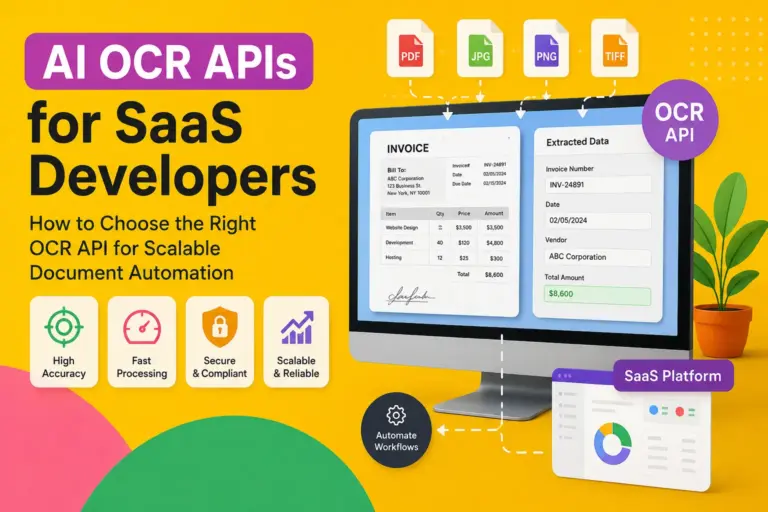
An intelligent SaaS OCR platform can extract those fields automatically and route the document into accounting workflows with minimal human intervention.
This is why many vendors now position their solutions under categories like:
- Intelligent Document Processing (IDP)
- Document AI
- Enterprise automation
- AI workflow orchestration
OCR has effectively become one layer inside a broader automation stack.
Core Features Enterprises Should Expect
Not all cloud OCR software is built for enterprise environments.
Consumer-grade OCR apps may work for occasional PDF conversion, but enterprise deployments require much deeper capabilities.
High-Accuracy Text Recognition
Accuracy directly affects operational cost.
Even small extraction errors create downstream problems in:
- accounts payable
- legal review
- insurance claims
- healthcare records
- procurement systems
Enterprise OCR vendors now use transformer-based AI models and contextual learning systems to improve extraction precision.
Intelligent Document Classification
Modern platforms should automatically recognize document types such as:
- invoices
- tax forms
- contracts
- IDs
- shipping manifests
- bank statements
- claims documents
Manual sorting becomes unsustainable at scale.
API-First Integration
Enterprise systems rarely operate independently.
Cloud OCR platforms should integrate with:
- ERP platforms
- CRM systems
- ECM software
- workflow engines
- cloud storage environments
- RPA platforms
Common integration targets include:
- SAP
- Oracle
- Salesforce
- Microsoft Dynamics
- ServiceNow
- SharePoint
- Google Workspace
Multi-Cloud and Hybrid Support
Many organizations operate hybrid infrastructure.
A flexible enterprise document cloud solution should support:
- AWS
- Microsoft Azure
- Google Cloud
- hybrid deployments
- private cloud configurations
Workflow Automation
OCR alone doesn’t solve operational bottlenecks.
Strong platforms support:
- approval routing
- exception handling
- validation workflows
- automated notifications
- audit tracking
- document lifecycle management
Analytics and Reporting
Enterprise buyers increasingly expect visibility into:
- processing times
- extraction accuracy
- exception rates
- workflow bottlenecks
- operational ROI
Advanced analytics helps justify automation investments internally.
Why CIOs Are Prioritizing SaaS OCR Platforms
Several enterprise trends are driving cloud OCR adoption simultaneously.
Remote and Distributed Workforces
Paper-based workflows collapse quickly in distributed environments.
Organizations need centralized digital document infrastructure that employees can access securely from anywhere.
Rising Compliance Requirements
Industries face increasing pressure around:
- data retention
- auditability
- privacy laws
- records management
- digital traceability
Cloud OCR systems improve searchable archives and compliance reporting.
AI Transformation Initiatives
Boards and executive teams increasingly expect measurable AI adoption.
Document processing is often one of the fastest areas to automate because:
- workflows already exist
- document volumes are large
- ROI is measurable
- manual labor costs are high
Operational Cost Reduction
Manual data entry remains expensive.
Finance departments, legal operations teams, insurers, logistics providers, and healthcare systems all spend substantial resources handling documents manually.
AI cloud automation reduces repetitive processing tasks while improving throughput.
Enterprise Use Cases Across Industries
Financial Services
Banks and financial institutions use cloud OCR software for:
- loan applications
- KYC verification
- mortgage documentation
- fraud analysis
- account onboarding
Speed matters heavily in customer acquisition workflows.
Healthcare
Healthcare organizations process:
- patient records
- insurance claims
- intake forms
- prescriptions
- compliance documentation
OCR systems help digitize fragmented paper-heavy workflows.
Legal Operations
Law firms and corporate legal departments use document AI for:
- contract indexing
- clause extraction
- due diligence
- litigation support
- compliance review
Searchable document repositories significantly reduce review time.
Logistics and Supply Chain
Supply chain organizations handle:
- bills of lading
- customs forms
- shipping labels
- invoices
- warehouse documentation
Automated extraction improves processing speed and shipment visibility.
Insurance
Insurance providers rely heavily on document-intensive workflows.
OCR automation supports:
- claims processing
- policy management
- underwriting
- customer onboarding
- fraud detection
Security, Compliance, and Data Governance
Security concerns remain one of the biggest barriers during SaaS OCR procurement.
CIOs evaluating secure OCR SaaS solutions typically focus on several areas.
Encryption Standards
Enterprise-grade vendors should support:
- encryption at rest
- encryption in transit
- customer-managed keys
- secure API authentication
Compliance Certifications
Depending on industry requirements, organizations may require:
- SOC 2
- ISO 27001
- HIPAA
- GDPR
- PCI DSS
- FedRAMP
Compliance alignment matters especially for regulated industries.
Data Residency
Global organizations increasingly require regional processing controls.
A cloud OCR vendor should clearly explain:
- where documents are processed
- where data is stored
- how backups are handled
- cross-border data transfer policies
Access Controls
Role-based permissions are essential for sensitive document workflows.
Advanced platforms include:
- SSO integration
- identity federation
- audit logging
- activity tracking
- granular access permissions
Cloud OCR Architecture and Integration Considerations
Enterprise OCR projects often fail because organizations underestimate integration complexity.
The OCR engine itself is only one component.
Successful deployments require alignment across:
- document ingestion
- workflow orchestration
- storage systems
- metadata tagging
- governance controls
- downstream applications
API Strategy Matters
API maturity is often a better indicator of enterprise readiness than marketing claims.
Buyers should evaluate:
- REST API availability
- webhook support
- SDK options
- rate limits
- documentation quality
- event-driven architecture support
Structured vs Unstructured Documents
Some platforms excel with standardized forms but struggle with unpredictable layouts.
Others use advanced AI models capable of handling:
- handwritten notes
- mixed formatting
- scanned images
- low-resolution PDFs
- multilingual documents
Testing with real production data is essential.
Human-in-the-Loop Validation
Even advanced AI models require exception management.
Strong enterprise platforms include:
- confidence scoring
- manual review queues
- validation dashboards
- correction workflows
- retraining mechanisms
Comparing Cloud OCR vs On-Premise OCR
Cloud OCR Advantages
Faster Deployment
SaaS OCR systems deploy significantly faster than legacy infrastructure-heavy solutions.
Scalability
Cloud compute scales dynamically during document spikes.
Lower Infrastructure Overhead
Organizations avoid maintaining:
- servers
- upgrades
- patching
- OCR engine tuning
AI Model Improvements
Cloud vendors continuously improve recognition models.
Customers benefit without major upgrade projects.
On-Premise OCR Advantages
Greater Data Control
Highly regulated industries sometimes require complete internal hosting.
Custom Infrastructure Requirements
Some enterprises maintain specialized workflows tied to internal environments.
Offline Processing
Air-gapped environments may require isolated OCR systems.
Hybrid Models Are Increasing
Many enterprises now adopt hybrid document processing strategies:
- sensitive documents processed privately
- standard workflows processed in public cloud environments
Evaluating OCR Accuracy in Real Enterprise Environments
Vendor demos rarely reflect production reality.
Actual enterprise documents contain:
- skewed scans
- handwritten notes
- stamps
- signatures
- inconsistent formatting
- damaged pages
Accuracy testing should include real operational samples.
Key Accuracy Metrics
Organizations should measure:
- field extraction accuracy
- table recognition performance
- classification precision
- exception rates
- processing latency
Confidence Scoring
Modern AI OCR systems provide confidence thresholds for extracted fields.
Low-confidence extractions can trigger human review automatically.
Continuous Learning Systems
Some SaaS OCR platforms improve over time through supervised corrections and feedback loops.
This becomes valuable in industries with repetitive document structures.
Intelligent Document Processing and Workflow Automation
OCR is increasingly part of broader intelligent automation ecosystems.
This evolution matters because extracting text alone rarely creates business value.
The real gains come from workflow automation.
End-to-End Document Pipelines
Modern document management software can:
- Ingest files automatically
- Classify document types
- Extract structured data
- Validate information
- Trigger approvals
- Route workflows
- Archive records
- Generate analytics
That dramatically reduces manual intervention.
RPA and OCR Integration
Robotic Process Automation (RPA) platforms frequently integrate with OCR systems.
Together, they automate:
- invoice entry
- customer onboarding
- claims processing
- procurement approvals
- HR document workflows
AI Decisioning Layers
Advanced enterprise document cloud systems increasingly include:
- anomaly detection
- fraud scoring
- predictive routing
- business rules engines
This moves OCR from passive extraction into operational intelligence.
Cost Structure and ROI Analysis
Enterprise OCR investments are usually evaluated against labor reduction and operational efficiency gains.
Common Pricing Models
Cloud OCR vendors often charge based on:
- pages processed
- API requests
- users
- workflow volume
- storage consumption
- AI model usage
Hidden Costs
Organizations should also consider:
- integration work
- training
- exception handling
- governance setup
- migration projects
ROI Drivers
The strongest ROI areas typically include:
- reduced manual entry
- faster processing cycles
- improved compliance
- fewer operational errors
- lower storage costs
- accelerated customer onboarding
For high-volume document environments, ROI can become measurable within months.
Common Implementation Mistakes
Treating OCR as a Standalone Tool
OCR must integrate into operational workflows.
Without process redesign, automation value remains limited.
Ignoring Exception Handling
No OCR platform achieves perfect extraction accuracy.
Human review workflows remain necessary.
Underestimating Data Quality Problems
Poor scan quality heavily affects outcomes.
Organizations often need:
- document standardization
- scanning improvements
- metadata governance
Choosing Based Only on Accuracy Claims
Accuracy benchmarks can be misleading.
Real-world testing matters more than marketing metrics.
How to Choose the Right Cloud OCR Vendor
Enterprise buyers should evaluate vendors across multiple dimensions.
Technical Evaluation
Review:
- API capabilities
- AI model flexibility
- scalability
- latency
- integration support
Security Review
Assess:
- compliance certifications
- encryption policies
- data residency controls
- audit capabilities
Operational Fit
Consider:
- workflow compatibility
- usability
- support quality
- implementation complexity
Vendor Stability
OCR vendors increasingly participate in broader enterprise AI ecosystems.
Long-term roadmap alignment matters.
Proof-of-Concept Testing
A real pilot project often reveals:
- hidden workflow issues
- integration complexity
- accuracy limitations
- scalability concerns
Production testing with actual documents is critical.
Emerging Trends in Enterprise Document AI
The OCR market is evolving rapidly.
Several trends are reshaping enterprise document automation.
Generative AI Integration
Large language models are being layered into document systems for:
- summarization
- semantic search
- contextual extraction
- contract analysis
Multimodal AI
Modern AI systems increasingly understand:
- text
- layout
- tables
- signatures
- visual structure
This improves complex document comprehension.
Autonomous Workflow Orchestration
Future platforms will automate more decision-making processes directly.
Industry-Specific AI Models
Vendors increasingly train OCR systems for vertical use cases such as:
- healthcare claims
- legal contracts
- banking documents
- insurance forms
Specialization improves accuracy substantially.
FAQ Section
What is cloud OCR software?
Cloud OCR software is a SaaS-based technology platform that converts scanned documents, PDFs, and images into machine-readable and searchable data using optical character recognition and AI-driven document processing.
How secure is enterprise OCR SaaS?
Most enterprise-grade secure OCR SaaS providers support advanced security controls including encryption, SSO, audit logging, role-based access controls, and compliance certifications such as SOC 2 and ISO 27001.
What industries benefit most from cloud OCR software?
Industries with high document volumes benefit heavily, including:
banking
insurance
healthcare
legal services
logistics
government
manufacturing
Can cloud OCR integrate with ERP systems?
Yes. Most enterprise SaaS OCR platforms integrate with ERP and business systems through APIs, connectors, and workflow automation tools.
What is the difference between OCR and intelligent document processing?
OCR extracts text from documents. Intelligent document processing combines OCR with AI technologies such as machine learning, NLP, classification, validation, and workflow automation.
How accurate are modern AI OCR systems?
Accuracy varies based on document quality and layout complexity, but modern AI cloud automation platforms can achieve very high extraction rates for structured and semi-structured documents when properly trained and configured.
Is cloud OCR better than on-premise OCR?
Cloud OCR offers scalability, lower infrastructure overhead, and faster deployment. On-premise OCR may still be preferred for highly regulated or isolated environments.
Conclusion
Enterprise document workflows are becoming central to digital transformation strategy, and cloud OCR software now plays a much larger role than simple text extraction.
Modern SaaS OCR platforms combine AI, workflow automation, security controls, analytics, and cloud scalability into a broader operational infrastructure layer. For CIOs and IT decision-makers, the challenge is no longer whether OCR works. The real challenge is selecting a platform that aligns with enterprise architecture, compliance requirements, integration strategy, and long-term automation goals.
Organizations that approach OCR strategically — rather than as a standalone utility — are seeing measurable improvements in efficiency, compliance, customer experience, and operational scalability.