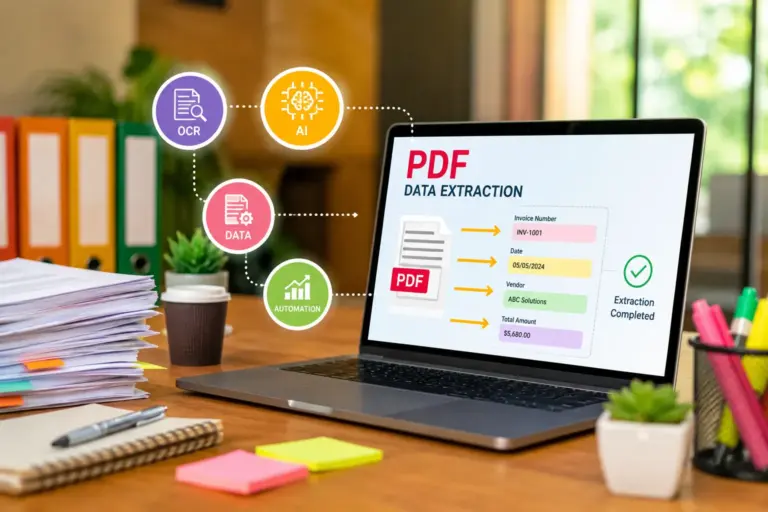
Best OCR Software for Small Businesses in 2026: Smarter Document Automation Without Enterprise Complexity
Best AI OCR Software for Small Businesses in 2026
Paperwork hasn’t disappeared. It just moved into PDFs, scanned invoices, receipts, contracts, shipping labels, purchase orders, and endless email attachments.
For small businesses, that creates a hidden operational problem: employees waste hours manually entering data into accounting systems, CRMs, inventory software, and spreadsheets. It’s slow, expensive, error-prone, and honestly frustrating.
That’s exactly where AI-powered OCR software changes the game.
Modern OCR platforms don’t just “read text from images” anymore. The best tools now understand document structure, classify forms automatically, extract accounting fields, validate totals, detect duplicates, and sync directly with platforms like QuickBooks, Xero, NetSuite, HubSpot, and Zapier.
For SMB owners and operations managers, this means faster workflows, lower admin costs, fewer bookkeeping errors, and dramatically better document handling.
The challenge is choosing the right platform without overpaying for enterprise features you’ll never use.
This guide breaks down the best OCR software for small business environments, including affordable OCR software options, AI bookkeeping tools, invoice scanning software, and cloud OCR tools designed for modern operational workflows.
Why OCR Matters for Small Businesses
Most SMBs underestimate how much operational drag comes from manual document handling.
Think about common tasks:
- Typing invoice totals into accounting software
- Pulling vendor details from PDFs
- Processing expense receipts
- Scanning contracts
- Reading handwritten forms
- Converting shipping documents into searchable data
- Managing AP/AR paperwork
Even a small team can lose dozens of hours every month doing repetitive administrative work.
AI OCR software automates those tasks by converting unstructured documents into usable, searchable, structured data.
That creates several immediate business advantages:
| Benefit | Business Impact |
|---|---|
| Faster invoice processing | Improved cash flow |
| Reduced manual entry | Lower labor costs |
| Better searchability | Faster operations |
| Fewer accounting errors | Improved compliance |
| Automated workflows | Higher scalability |
| Real-time document extraction | Better reporting |
For startups operating lean teams, OCR becomes less of a convenience tool and more of an operational multiplier.
What Modern AI OCR Software Actually Does
Traditional OCR software was basically a text scanner. It converted printed text into editable text.
Modern AI OCR platforms are far more sophisticated.
Today’s leading systems combine:
- Optical Character Recognition (OCR)
- Natural Language Processing (NLP)
- Machine Learning
- Document Classification
- Intelligent Data Extraction
- Workflow Automation
- API Connectivity
That means the software can:
- Detect invoice fields automatically
- Extract vendor names
- Read receipt totals
- Match PO numbers
- Classify document types
- Flag missing information
- Learn from corrections
- Route documents through approval workflows
The difference between legacy OCR and AI OCR is similar to the difference between a calculator and an accountant.
Key Features SMBs Should Prioritize
Not every OCR tool is built for small business workflows.
Some platforms are enterprise-heavy and overly complex. Others are lightweight but lack automation depth.
Here’s what actually matters for SMB buyers.
1. High OCR Accuracy
Accuracy matters more than flashy dashboards.
Poor extraction accuracy creates downstream problems:
- bookkeeping errors
- duplicate payments
- reconciliation issues
- inventory mismatches
Look for:
- AI-based extraction
- handwriting recognition
- multilingual support
- adaptive learning
2. Accounting Integrations
OCR software becomes far more valuable when connected to accounting systems.
Important integrations include:
- QuickBooks
- Xero
- FreshBooks
- Sage
- NetSuite
- Zoho Books
Direct syncing reduces manual reconciliation work.
3. Invoice and Receipt Extraction
For most SMBs, invoice scanning software is the core use case.
The best platforms automatically extract:
- invoice numbers
- due dates
- tax values
- vendor names
- line items
- totals
- payment terms
Some tools even detect duplicate invoices automatically.
4. Workflow Automation
OCR without automation still leaves operational gaps.
Modern small business automation platforms should support:
- approval routing
- auto-tagging
- email parsing
- cloud storage sync
- API workflows
- ERP integration
5. Cloud Accessibility
Cloud OCR tools are especially valuable for distributed teams.
Advantages include:
- remote access
- easier collaboration
- mobile scanning
- centralized storage
- automatic updates
- lower infrastructure costs
Best AI OCR Software for Small Businesses
1. ABBYY FineReader PDF
Best for: High-accuracy document conversion and compliance workflows
ABBYY has been a leader in OCR technology for years, and its AI-powered recognition engine remains one of the most accurate available.
Strengths
- Exceptional OCR precision
- Strong PDF editing
- Multi-language support
- Enterprise-grade extraction
- Excellent for legal and finance workflows
Weaknesses
- Can feel complex for smaller teams
- Pricing scales quickly
Ideal SMB Use Cases
- Accounting firms
- Legal offices
- Insurance agencies
- Compliance-heavy operations
If your business processes thousands of documents monthly, ABBYY is one of the safest long-term investments.
2. Rossum
Best for: AI invoice automation
Rossum focuses heavily on intelligent invoice processing rather than generic OCR.
Its AI engine understands document context, making it particularly effective for AP automation.
Strengths
- Excellent invoice extraction
- Strong AI learning
- Workflow automation
- ERP integrations
- Scalable automation pipelines
Weaknesses
- More expensive than lightweight tools
- Less suitable for generic OCR tasks
Ideal SMB Use Cases
- Accounts payable teams
- Ecommerce businesses
- Logistics companies
- Multi-vendor operations
Rossum is especially attractive for growing companies drowning in invoice processing volume.
3. Nanonets
Best for: Affordable AI OCR automation
Nanonets has become extremely popular among startups because it balances affordability with strong AI extraction capabilities.
Strengths
- Fast deployment
- Custom model training
- API-friendly
- Good automation features
- Competitive pricing
Weaknesses
- UI occasionally feels technical
- Advanced workflows require setup time
Ideal SMB Use Cases
- SaaS startups
- Ecommerce operations
- Finance automation
- Inventory workflows
For SMBs wanting AI-powered document automation without enterprise pricing, Nanonets is one of the strongest contenders.
4. Adobe Acrobat AI OCR
Best for: General business document workflows
Many small businesses already use Adobe Acrobat. Its OCR capabilities have improved significantly with AI enhancements.
Strengths
- Familiar interface
- Strong PDF ecosystem
- Reliable text extraction
- Easy editing
- Broad compatibility
Weaknesses
- Limited advanced automation
- Not AP-focused
Ideal SMB Use Cases
- Office administration
- HR documentation
- Contract management
- General PDF workflows
Adobe works well when businesses want OCR functionality without adopting another dedicated platform.
5. Microsoft Lens + Power Automate
Best for: Microsoft ecosystem users
Businesses already running Microsoft 365 can build surprisingly powerful OCR workflows using Microsoft Lens and Power Automate.
Strengths
- Strong ecosystem integration
- Mobile-friendly
- Affordable for existing Microsoft users
- Flexible workflow automation
Weaknesses
- Requires workflow configuration
- OCR accuracy varies by document quality
Ideal SMB Use Cases
- Microsoft-centric businesses
- Mobile teams
- Internal document processing
- SMB workflow automation
This combination offers strong ROI for businesses already invested in Microsoft infrastructure.
6. Docsumo
Best for: Financial document extraction
Docsumo specializes in extracting structured data from financial and operational documents.
Strengths
- Strong finance-focused extraction
- Table recognition
- AI validation
- API integrations
Weaknesses
- Smaller ecosystem
- Less consumer familiarity
Ideal SMB Use Cases
- Mortgage brokers
- Financial services
- Insurance firms
- Lending businesses
Its structured extraction engine is particularly effective for complex forms.
7. Klippa
Best for: Expense management automation
Klippa focuses heavily on receipts, expenses, and bookkeeping automation.
Strengths
- Receipt OCR
- Expense workflows
- Mobile scanning
- Compliance features
- Fast extraction
Weaknesses
- Narrower use case scope
- Less flexible for broader OCR applications
Ideal SMB Use Cases
- Remote teams
- Travel-heavy businesses
- Expense-heavy operations
For SMBs prioritizing AI bookkeeping tools, Klippa is worth serious consideration.
8. Google Cloud Vision OCR
Best for: Developers and custom applications
Google’s OCR engine is extremely powerful but more technical than turnkey SaaS platforms.
Strengths
- Excellent OCR engine
- API scalability
- Strong AI recognition
- Cloud-native architecture
Weaknesses
- Requires development resources
- Not plug-and-play
Ideal SMB Use Cases
- Tech startups
- SaaS platforms
- Custom workflow builders
Businesses with internal development resources can build highly customized automation pipelines using Google Cloud Vision.
9. Zoho Expense OCR
Best for: Budget-conscious SMBs
Zoho continues to expand its business automation ecosystem, and its OCR capabilities integrate naturally with expense and accounting workflows.
Strengths
- Affordable pricing
- Good ecosystem integration
- Receipt automation
- SMB-friendly UI
Weaknesses
- Less advanced AI extraction
- Limited enterprise depth
Ideal SMB Use Cases
- Small accounting teams
- Startups
- Budget-conscious businesses
Zoho offers strong value for smaller companies needing lightweight automation.
10. Veryfi
Best for: Real-time mobile receipt OCR
Veryfi is built around rapid data extraction for receipts and financial documents.
Strengths
- Extremely fast extraction
- Mobile-first experience
- Good API performance
- Expense automation
Weaknesses
- Specialized use cases
- Less suitable for broad document management
Ideal SMB Use Cases
- Field service businesses
- Delivery operations
- Mobile workforces
Veryfi excels when speed and mobile capture matter most.
OCR vs Traditional Data Entry
Many SMB owners still rely on manual data entry because it feels “simpler.”
But manual processes create hidden costs:
- payroll inefficiency
- slower reporting
- delayed invoicing
- human error
- reconciliation delays
AI OCR tools shift operations from reactive administration to automated processing.
A single AP employee manually processing invoices might handle:
- 30–50 invoices daily
An AI-assisted workflow can often process:
- hundreds per day
That difference compounds quickly as businesses scale.
How AI OCR Helps Accounting and Bookkeeping
OCR technology has become deeply connected to modern bookkeeping automation.
Today’s AI bookkeeping tools can:
- categorize expenses
- extract tax values
- sync receipts automatically
- reconcile invoices
- detect duplicates
- automate approvals
For accounting teams, that means fewer repetitive tasks and better financial visibility.
This is especially important for:
- ecommerce businesses
- agencies
- logistics firms
- multi-location retailers
- construction companies
These industries generate large document volumes that overwhelm manual workflows.
Choosing Between Cloud OCR and On-Premise OCR
Cloud OCR Tools
Most SMBs benefit more from cloud-based systems.
Advantages
- Lower upfront cost
- Easier deployment
- Remote access
- Automatic updates
- API scalability
Disadvantages
- Subscription pricing
- Internet dependency
- Vendor lock-in concerns
On-Premise OCR
Less common for SMBs but still relevant in regulated industries.
Advantages
- Greater data control
- Internal infrastructure ownership
- Custom security policies
Disadvantages
- Higher IT overhead
- More maintenance
- Slower scaling
For most startups and SMBs, cloud OCR tools provide the best balance of flexibility and affordability.
OCR Accuracy: What Really Impacts Performance
OCR performance depends heavily on document quality.
Even the best AI models struggle with:
- blurry scans
- handwritten notes
- poor lighting
- skewed documents
- low-resolution images
Businesses can improve extraction accuracy by:
- standardizing scans
- using mobile capture guidelines
- improving invoice formatting
- validating templates
- training AI models with corrections
Modern OCR engines also improve over time through machine learning feedback loops.
Common OCR Mistakes Small Businesses Make
Buying Enterprise Software Too Early
Many SMBs overbuy.
Complex enterprise platforms often require:
- consultants
- implementation projects
- workflow engineers
Smaller businesses usually benefit more from simpler SaaS automation tools initially.
Ignoring Workflow Integration
OCR alone isn’t enough.
The real value comes from connecting extraction with:
- accounting systems
- CRMs
- inventory software
- approval flows
- cloud storage
Focusing Only on Price
Cheap OCR tools often produce lower extraction accuracy.
That leads to:
- manual correction time
- bookkeeping errors
- reconciliation issues
ROI matters more than subscription cost alone.
AI OCR Use Cases by Industry
Ecommerce
- supplier invoices
- shipping labels
- inventory documents
- returns processing
Healthcare
- patient intake forms
- insurance paperwork
- compliance documentation
Legal
- contracts
- case documents
- searchable archives
Construction
- receipts
- purchase orders
- field documentation
Real Estate
- lease agreements
- mortgage paperwork
- property records
Security and Compliance Considerations
Document automation involves sensitive business data.
SMBs should evaluate:
- encryption standards
- SOC 2 compliance
- GDPR readiness
- access controls
- audit logs
- retention policies
For finance-heavy businesses, security features matter just as much as OCR accuracy.
OCR Software Pricing Breakdown
Pricing models vary dramatically.
Per-Document Pricing
Common among AI-first platforms.
Best for:
- low-volume businesses
- seasonal operations
Subscription Pricing
Fixed monthly pricing with usage tiers.
Best for:
- predictable workloads
- growing SMBs
API Consumption Pricing
Popular among developer-focused OCR platforms.
Best for:
- SaaS integrations
- custom workflows
Workflow Automation Opportunities
OCR becomes exponentially more valuable when paired with automation platforms.
Popular integrations include:
- Zapier
- Make
- Power Automate
- UiPath
- QuickBooks
- Xero
- Slack
- Google Drive
- Dropbox
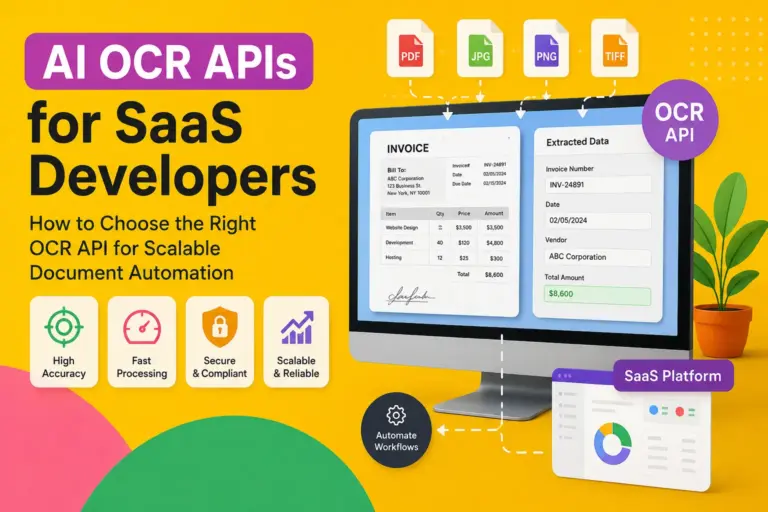
A modern invoice workflow might look like this:
- Invoice arrives by email
- OCR extracts fields automatically
- AI validates totals
- Approval request triggers
- Accounting system syncs
- Payment status updates automatically
That entire process can happen with minimal human involvement.
FAQ
What is the best OCR software for small business accounting?
For accounting-heavy workflows, Rossum, Nanonets, Veryfi, and ABBYY are among the strongest options due to their invoice extraction and bookkeeping automation capabilities.
Is OCR software worth it for small businesses?
Yes. Even small teams can save dozens of administrative hours monthly through automated invoice processing, receipt capture, and searchable document management.
Which OCR software integrates with QuickBooks?
Several tools support QuickBooks integrations, including:
Nanonets
Veryfi
Zoho Expense
Rossum
Klippa
What’s the difference between OCR and AI OCR?
Traditional OCR converts images into text. AI OCR understands document structure, extracts data intelligently, classifies documents, and improves through machine learning.
Are cloud OCR tools secure?
Most reputable cloud OCR providers use encryption, role-based permissions, and compliance frameworks like SOC 2 and GDPR. Businesses handling sensitive financial or healthcare data should verify compliance requirements carefully.
Can OCR read handwritten documents?
Modern AI OCR platforms can read handwriting with varying levels of accuracy, though performance depends heavily on handwriting quality and document clarity.
Final Thoughts
The OCR market has shifted far beyond simple document scanning.
Today’s best OCR software for small business operations functions as a core automation layer connecting accounting, finance, operations, and workflow management.
For SMB owners, the real question is no longer whether OCR is useful. It’s how much operational inefficiency still exists without it.
The strongest platforms combine:
- high extraction accuracy
- accounting integrations
- workflow automation
- cloud accessibility
- scalable AI learning
For most growing businesses, AI-powered OCR quickly becomes one of the highest-ROI operational software investments available.