ReadSpeaker and Brickfield Education Labs
Creating accessible learning experiences involves much more than meeting compliance requirements or checking accessibility before publishing a course.
Learners engage with content in different ways, on different devices, in different environments, and with different needs. While creating accessible course content is an essential first step, accessibility continues long after a course is published. It becomes part of every learner interaction, helping individuals engage with content in the way that meets their needs at that time and, ultimately, contributes to learners’ success.
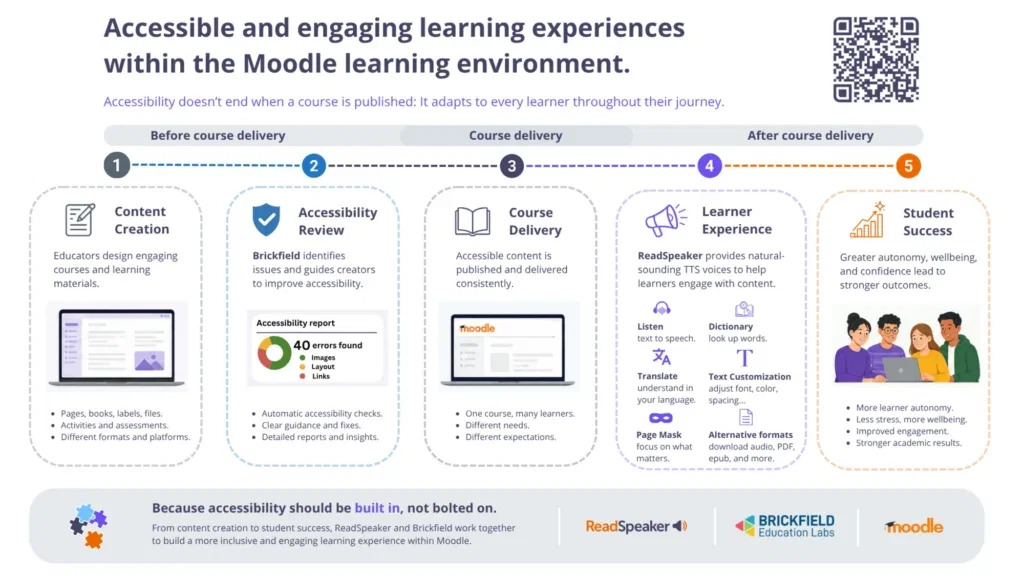
Within the Moodle learning environment, accessibility is most effective when it is considered across the entire learning journey. ReadSpeaker and Brickfield, both Certified Moodle Integrations, support different stages of that journey while sharing the same goal: helping institutions build more accessible, inclusive and engaging learning experiences.
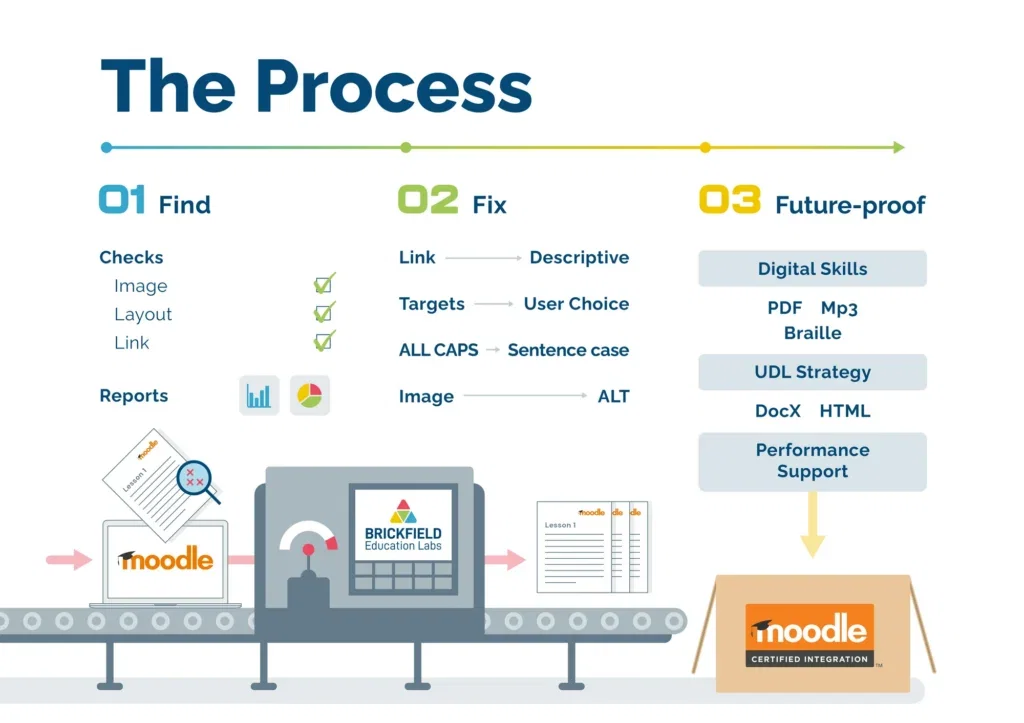
The Brickfield Accessibility Toolkit has a packaged accessibility checker that improves the accessibility of educational content housed within the Moodle Learning Management System (LMS).
For educators, the Brickfield Accessibility Toolkit:
- Analyses course content for accessibility issues
- Provides reports on the issues found
- Offers a bulk course update feature to correct common problems; users can quickly make simple fixes like addressing broken links, adding image descriptions, and more
Gavin Henrick, Co-Founder of Brickfield, emphasises the “find and fix” method for making course content accessible: “We want educators to be empowered to find and fix accessibility concerns before their courses go live—or even after they’ve been published—so students of all abilities can interact meaningfully with the content.”
Brickfield also provides unlimited accessibility courses to teach educators how to improve accessibility as they create lessons in the future.
For students, Brickfield offers file conversions into formats like ePub, Electronic Braille, and audio, as well as an introduction to digital skills training.
By making accessibility part of the authoring workflow, Brickfield helps institutions create stronger foundations for inclusive learning while supporting accessibility from the earliest stages of course development.
What is ReadSpeaker?
ReadSpeaker is a flexible TTS platform that improves the accessibility of educational content presented on any platform.
For educators, ReadSpeaker is a simple way to deliver a robust, accessible learning experience for every student.
For students, ReadSpeaker:
- Provides high-quality audio and translations of online content
- A full suite of reading, writing, and studying tools to support diverse learners, including the ability to:
- Adjust the way text appears on their screens to improve readability
- Adjust content displays using page masks
- Highlight text for more effective studying
- Customise the programmable dictionary and pronunciation library
- Translate content into your own language
ReadSpeaker provides support for learners who like to hear text spoken aloud, as well as neurodivergent students, other language learners, visually impaired users, and people who have trouble with visual processing.
By adapting the learning experience to individual needs, ReadSpeaker helps learners engage more confidently and independently with accessible course content, improving learner agency.
Accessibility Across the Full Learning Experience
Accessibility is most effective when it supports every stage of the learning journey. As Certified Moodle Integrations, ReadSpeaker and Brickfield complement one another by supporting different aspects of accessibility within Moodle.
Brickfield primarily supports educators and administrators throughout the authoring process, helping them create, review and improve accessible course content before it is published.
ReadSpeaker primarily supports learners by helping them engage with that content through natural text to speech, reading support and personalised learning tools that adapt to different learning needs and contexts.
Together, they help institutions move beyond seeing accessibility as a single checkpoint. Instead, accessibility becomes a continuous experience that starts with course creation and continues through course delivery, learner engagement and ultimately student success.
Watch the video below to see how ReadSpeaker and Brickfield work together across the full Moodle learning journey.
Conclusion: Accessibility Should Be Built In, Not Bolted On
Accessibility is not one feature or one stage of course development. It is a continuous process that evolves alongside every learner.
From content creation and accessibility review, through course delivery, learner engagement and student success, each stage contributes to a more inclusive learning experience.
One of the core principles of Universal Design for Learning (UDL) is designing learning experiences that anticipate learner variability from the very beginning, rather than adapting only after barriers have appeared.
Brickfield helps institutions build accessibility into course creation by supporting educators as they review and improve learning materials before publication.
ReadSpeaker helps learners engage with that accessible content in ways that reflect their individual needs and contexts.
Together, they demonstrate that accessibility is not a single feature or a final step in course development. It is an ongoing commitment that begins during content creation and continues throughout every learner interaction.
Because accessibility doesn’t end when a course is published.
And because accessibility should be built in, not bolted on.
Would you like to find out how combining ReadSpeaker and Brickfield can help your institution offer a more accessible, inclusive and engaging experience to your learners? Contact us here
Frequently Asked Questions
Can ReadSpeaker and Brickfield work together in Moodle?
Yes. ReadSpeaker and Brickfield are both Certified Moodle Integrations and integrate seamlessly within the Moodle environment. Together, they support accessibility across the full learning journey, from course creation through to learner engagement.
What is the difference between ReadSpeaker and Brickfield?
Brickfield primarily supports educators and administrators by helping them create, review and improve accessible course content. ReadSpeaker primarily supports learners by helping them engage with that content through text to speech, reading support, translation and personalised learning tools. Together, they provide complementary accessibility support.
Do I need both ReadSpeaker and Brickfield?
That depends on your accessibility goals. Institutions focused on creating accessible content may benefit from Brickfield, while those looking to enhance the learner experience may benefit from ReadSpeaker. Many institutions choose both because accessibility extends beyond content creation and continues throughout the learner journey.
How do ReadSpeaker and Brickfield support Universal Design for Learning (UDL)?
Both solutions align with the principles of Universal Design for Learning by helping institutions reduce barriers to learning. Brickfield supports accessible course design and learner agency, while ReadSpeaker provides learners with multiple ways to engage with content based on their individual needs.
Why is accessibility more than course compliance?
Meeting accessibility standards is an important first step, but accessible learning also means ensuring learners can successfully engage with content. Features such as text to speech, reading support, translation and personalised reading tools help learners interact with accessible content in ways that promote autonomy, confidence and student success.