PANet Paper Walkthrough: When Feature Pyramids Go Bottom-Up
I wrote about the FPN (Feature Pyramid Network) architecture [1], which is one of the most influential necks we can apply to a backbone model. FPN was first introduced to enhance the capability of an object detection model to detect small objects. However, Liu et al. in 2018 found that the information flow of FPN had room for improvement. So, they decided to address this gap by proposing PANet in their research paper titled “Path Aggregation Network for Instance Segmentation” [2], which we are going to discuss in this article.
A Little Bit About FPN
PANet is built on top of the FPN architecture, so I think it would be a good idea to talk a little bit about how FPN works in advance. In a CNN-based backbone model, the deeper feature maps have different characteristics from the shallower ones. The feature maps from deeper layers tend to have high semantic information, yet it does not have that much amount of spatial information. Conversely, feature maps from shallower layers contain more spatial information but have less semantic information. These facts essentially tell us that we should use the deeper feature maps if we were to predict large objects and use the shallower feature maps for predicting small objects.
However, the authors of PANet found that it is not quite appropriate to directly take information from shallower feature maps to detect small objects. This is because these feature maps contain minimal amount of semantic information, which essentially implies that they do not have a good understanding about the content of the image. FPN solves this issue by combining feature maps from the deeper layers and the shallower ones. By doing so, we can basically inject semantic information into the shallower feature maps that they previously didn’t have.
What FPN Solves
Now take a look at the illustration in Figure 1 below to better understand this idea. The upward flow on the left is the main backbone model, while the one going downwards on the right (a.k.a. the top-down pathway) is the FPN. The horizontal arrows that go directly to the FPN part (called lateral connections) are the tensors to be combined with the one from the deeper layers. In this illustration, the FPN produces three feature maps where the detection head will make the bounding box predictions from.
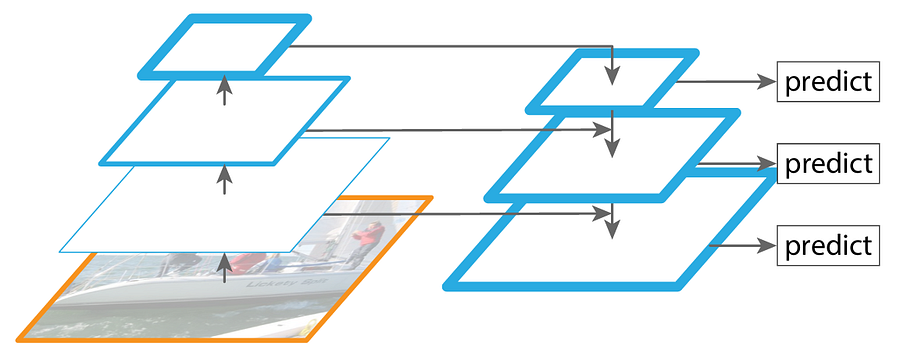
The blue borderlines in the illustration above indicate the amount of semantic information contained within the corresponding feature map. You can see in the original backbone that the borderline gets thicker as we get deeper into the network, meaning that the feature map that has the highest semantic information is the one produced by the deepest layer. By using feature map combination mechanism proposed by FPN, we can see that the shallower feature maps are now rich of semantic information which makes them suitable for detecting small objects accurately.
What FPN Doesn’t Solve
At this point we might think that FPN is just fine as it is able to allow a model to detect small objects better compared to the plain backbone model. In fact, the authors of PANet still see something that isn’t solved by FPN just yet, which as I’ve mentioned earlier is related to the information flow problem. Now let’s take a look at Figure 2 below.
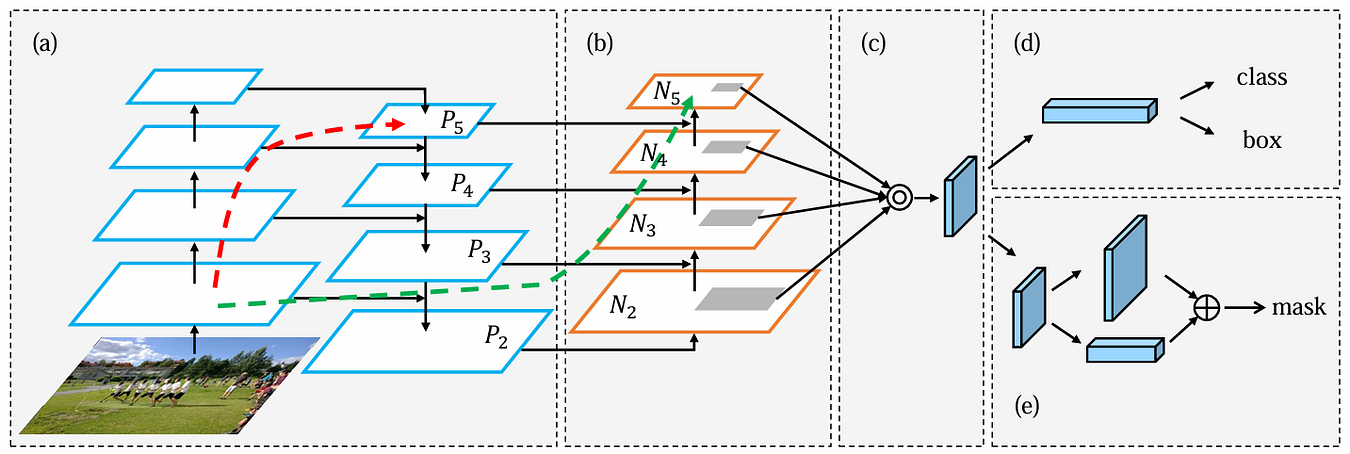
In this figure, the component referred to as (a) is the backbone model that has been equipped with FPN, which is basically the same structure I showed you in Figure 1. In FPN, feature maps P₅, P₄, P₃, and P₂ become the basis of the detection head to make predictions, where P₂ has a high semantic information thanks to the flow in the top-down pathway. And here’s the problem FPN doesn’t solve: while FPN effectively enriches feature maps in shallower layers, the deeper feature maps still lack spatial information. In the beginning of this article I said that the deeper and the shallower feature maps in a backbone have their own advantage and drawback, and FPN only solves the drawback of the shallower feature maps while still leaving the problem of the deeper feature maps untouched. Based on this notion, the authors of PANet thought that we could still improve the ability of an object detection model in detecting large objects by injecting spatial information to the deeper feature maps, which also potentially allows the overall accuracy of the detection model to get even higher.
It is definitely normal for a deeper layer to lose spatial information due to the downsampling mechanism in the backbone. However, this is actually not solely caused by the downsampling itself. Instead, the long information travel in the stack of convolution layers also causes spatial information to degrade. So, if we cannot omit the downsampling operation within the backbone, we can still minimize this spatial information degradation by creating shortcut paths — just like the skip-connections in ResNet.
How PANet Solves the Problem Unsolved by FPN
The authors of PANet proposed a clever idea, where they added a stack of several convolution layers placed on top of the existing FPN alongside the lateral connections (the part referred to as (b) in Figure 2). It might seem counterintuitive at glance — how can adding more layers allow us to get shorter paths instead? In fact, this approach is valid as it really allows the shallower feature maps to deliver spatial information to the deeper layers more seamlessly.
Now let’s go back to Figure 2 and pay attention to the dashed arrows. Both arrows essentially denote the flow of the C₂ tensor (the backbone feature at the same spatial resolution as P₂ and N₂) to the deepest layer. The red one is when we only use the top-down pathway of FPN, while the green one is when we also use the bottom-up path augmentation of PANet.
If we don’t utilize PANet, the only way for the C₂ tensor to get into the last layer P₅ is by traveling up through the entire backbone one by one, which can actually be over 100 layers in total. And as we discussed earlier, this causes degradation in the spatial information. If we compare this with the flow when we use PANet, it essentially allows us to use the path traced by the green arrow. Keep in mind that the number of layers within the top-down and the bottom-up pathways are much less than the one in the backbone, hence reducing the path from 100+ layers to around 10 layers to reach N₅ (which is in the same level as P₅). By doing this, we can definitely preserve much more spatial information. And so, by combining FPN and PANet, we get bidirectional information flow that enriches shallower layers with semantic information and deeper layers with spatial information.
By the way, in this article we will focus on how we can integrate the (a) and (b) parts in the architecture, which is the core contribution that has been widely adopted in modern architectures. The full PANet paper actually also includes the adaptive pooling mechanism (c), bounding box prediction for object detection (d), and fully-connected feature fusion for segmentation (e), which are beyond our scope here.
The Detailed PANet Architecture
In FPN, the P₅, P₄, P₃, and P₂ tensors will directly be forwarded to the detection head, whereas in PANet, these four tensors will be transferred to the bottom-up path augmentation which then produces the N₅, N₄, N₃, and N₂ tensors. These N tensors are the ones to be used by the detection head as the basis of the object detection prediction.
Generally speaking, the way PANet performs feature combination is similar to FPN yet is done in reversed way. Take a look at Figure 3 below to see the detailed process.
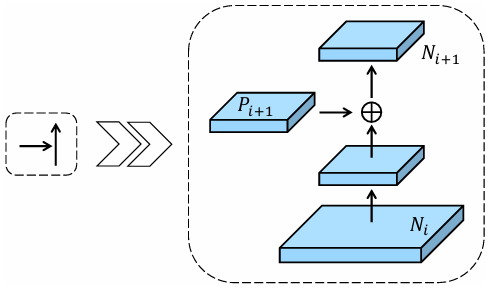
What we initially do in the above building block is to process the Nᵢ tensor with a 3×3 convolution. The stride of this conv layer is set to 2 since we want it to reduce the spatial dimension by half. Next, we combine the Pᵢ₊₁ tensor and the downsampled Nᵢ tensor using element-wise summation. This combined tensor is then processed by another 3×3 convolution layer. This time we don’t want this layer to reduce the spatial dimension any further, so we need to set the stride to 1. Finally, as all processes above are done, we will have the Nᵢ₊₁ tensor, which is ready to be processed again with the same procedure until we eventually get all the N₅, N₄, N₃, and N₂ tensors.
There are actually several things you need to keep in mind here. First, since N₂ is the very first tensor in the bottom-up path augmentation, there is actually nothing to combine to obtain this tensor. Thus, we can simply perceive P₂ as the N₂ tensor itself. Second, here we need to put a ReLU activation function after each convolution layer. In fact, this is different from FPN which completely omits the activation functions. So, later in the implementation, our top-down pathway will not use any activation function at all, yet we will have all the convs in the bottom-up path augmentation equipped with ReLU. And third, all tensors throughout the entire bottom-up path augmentation have exactly 256 channels, meaning that the convolution layers here do not change the number of channels at all.
That’s pretty much all about the detailed flow of the PANet architecture. In the next section I am going to demonstrate how to implement it from scratch.
PANet From Scratch
The idea of our implementation here is that we will create a dummy backbone with an FPN and place the PANet layers on top of it. As usual, what we need to do first in the code is to import the required modules. See Codeblock 1 below.
# Codeblock 1
import torch
import torch.nn as nn
CNN Implementation
What I actually mean by a dummy backbone is a very simple CNN model. In fact the CNN class in Codeblock 2 below is exactly the same as the one in my FPN article [1]. Just keep in mind that the actual backbone used in the paper is ResNet, but since the focus of this article is PANet, I’ll use a standard CNN instead. (By the way, I actually got a separate article about ResNet. Check that out at the link in reference [4] in case you’re interested to implement FPN on ResNet from scratch.)
# Codeblock 2
class CNN(nn.Module):
    def __init__(self):
        super().__init__()

        self.relu = nn.ReLU()
        self.maxpool = nn.MaxPool2d(kernel_size=3, stride=2, padding=1)

        self.conv1 = nn.Conv2d(in_channels=3, out_channels=64, kernel_size=3, padding=1)
        self.conv2 = nn.Conv2d(in_channels=64, out_channels=256, kernel_size=3, padding=1)
        self.conv3 = nn.Conv2d(in_channels=256, out_channels=512, kernel_size=3, padding=1)
        self.conv4 = nn.Conv2d(in_channels=512, out_channels=1024, kernel_size=3, padding=1)
        self.conv5 = nn.Conv2d(in_channels=1024, out_channels=2048, kernel_size=3, padding=1)

    def forward(self, x):
        print(f'original\t: {x.size()}\n')

        x = self.relu(self.conv1(x))
        print(f'after conv1\t: {x.size()}')

        x = self.maxpool(x)
        print(f'after pool\t: {x.size()}\n')

        x = self.relu(self.conv2(x))
        print(f'after conv2\t: {x.size()}')

        x = self.maxpool(x)
        print(f'after pool (c2)\t: {x.size()}\n')

        c2 = x.clone()

        x = self.relu(self.conv3(x))
        print(f'after conv3\t: {x.size()}')

        x = self.maxpool(x)
        print(f'after pool (c3)\t: {x.size()}\n')

        c3 = x.clone()

        x = self.relu(self.conv4(x))
        print(f'after conv4\t: {x.size()}')

        x = self.maxpool(x)
        print(f'after pool (c4)\t: {x.size()}\n')

        c4 = x.clone()

        x = self.relu(self.conv5(x))
        print(f'after conv5\t: {x.size()}')

        c5 = self.maxpool(x)
        print(f'after pool (c5)\t: {c5.size()}\n')

        return c2, c3, c4, c5
The CNN class above returns multiple outputs: c2, c3, c4 and c5, where c5 is the tensor from the deepest layer. In order to check if this class works properly, we will test it by passing a tensor through it. The dummy tensor I initialize in Codeblock 3 below has the dimension of 3×224×224, which matches the input shape of the ResNet model.
# Codeblock 3
cnn = CNN()

x = torch.randn(1, 3, 224, 224)
out_cnn = cnn(x)

c2, c3, c4, c5 = out_cnn
Below you can see how the backbone model transforms our input tensor throughout the network. Later on, all the C tensors will be used as the input of our FPN.
# Codeblock 3 Output
original        : torch.Size([1, 3, 224, 224])

after conv1     : torch.Size([1, 64, 224, 224])
after pool      : torch.Size([1, 64, 112, 112])

after conv2     : torch.Size([1, 256, 112, 112])
after pool (c2) : torch.Size([1, 256, 56, 56])

after conv3     : torch.Size([1, 512, 56, 56])
after pool (c3) : torch.Size([1, 512, 28, 28])

after conv4     : torch.Size([1, 1024, 28, 28])
after pool (c4) : torch.Size([1, 1024, 14, 14])

after conv5     : torch.Size([1, 2048, 14, 14])
after pool (c5) : torch.Size([1, 2048, 7, 7])
FPN Implementation
And here’s what the FPN class looks like. I am not going to get very deep into the flow of this network since I’ve covered it thoroughly in my previous article [1].
# Codeblock 4
class FPN(nn.Module):
    def __init__(self):
        super().__init__()

        self.upsample = nn.Upsample(scale_factor=2, mode='nearest')    #(1)

        self.lateral_c5 = nn.Conv2d(in_channels=2048, out_channels=256, kernel_size=1)
        self.lateral_c4 = nn.Conv2d(in_channels=1024, out_channels=256, kernel_size=1)
        self.lateral_c3 = nn.Conv2d(in_channels=512,  out_channels=256, kernel_size=1)
        self.lateral_c2 = nn.Conv2d(in_channels=256,  out_channels=256, kernel_size=1)

        self.smooth_m4  = nn.Conv2d(in_channels=256, out_channels=256, kernel_size=3, padding=1)
        self.smooth_m3  = nn.Conv2d(in_channels=256, out_channels=256, kernel_size=3, padding=1)
        self.smooth_m2  = nn.Conv2d(in_channels=256, out_channels=256, kernel_size=3, padding=1)

    def forward(self, c2, c3, c4, c5):
        m5 = self.lateral_c5(c5)
        p5 = m5

        m4 = self.upsample(m5) + self.lateral_c4(c4)
        p4 = self.smooth_m4(m4)

        m3 = self.upsample(m4) + self.lateral_c3(c3)
        p3 = self.smooth_m3(m3)

        m2 = self.upsample(m3) + self.lateral_c2(c2)
        p2 = self.smooth_m2(m2)

        return p2, p3, p4, p5
For now, let’s just focus on the returned P tensors which we will use as the input of our PANet. You can see in the output of the code below that all these P tensors have 256 channels, which I believe is why the authors eventually ended up with this number of channels for the entire PANet structure.
# Codeblock 5
fpn = FPN()

out_fpn = fpn(c2, c3, c4, c5)
p2, p3, p4, p5 = out_fpn

print(f'p2: {p2.size()}')
print(f'p3: {p3.size()}')
print(f'p4: {p4.size()}')
print(f'p5: {p5.size()}')
# Codeblock 5 Output
p2: torch.Size([1, 256, 56, 56])
p3: torch.Size([1, 256, 28, 28])
p4: torch.Size([1, 256, 14, 14])
p5: torch.Size([1, 256, 7, 7])PANet Implementation
And finally, it is time to implement the PANet itself. In Codeblock 6 below, what we do first is to initialize the downsample_n{2,3,4} layers. As the name suggests, these layers are responsible for performing spatial downsampling, which is the reason that we set the stride parameter of these layers to 2. Next, we initialize conv_{n2down_p3, n3down_p4, n4down_p5}. These three convolution layers are used to process the combined tensors. For instance, the layer with suffix n2down_p3 will take the combined downsampled N₂ and the P₃ tensors for the input. Don’t forget to initialize the ReLU activation function as we will use them after each convolution layer.
# Codeblock 6
class PANet(nn.Module):
    def __init__(self):
        super().__init__()

        self.downsample_n2 = nn.Conv2d(in_channels=256, out_channels=256, kernel_size=3, stride=2, padding=1)
        self.downsample_n3 = nn.Conv2d(in_channels=256, out_channels=256, kernel_size=3, stride=2, padding=1)
        self.downsample_n4 = nn.Conv2d(in_channels=256, out_channels=256, kernel_size=3, stride=2, padding=1)

        self.conv_n2down_p3 = nn.Conv2d(in_channels=256, out_channels=256, kernel_size=3, padding=1)
        self.conv_n3down_p4 = nn.Conv2d(in_channels=256, out_channels=256, kernel_size=3, padding=1)
        self.conv_n4down_p5 = nn.Conv2d(in_channels=256, out_channels=256, kernel_size=3, padding=1)

        self.relu = nn.ReLU()

    def forward(self, p2, p3, p4, p5):

        n2 = p2                                         #(1)
        print(f'n2\t\t: {n2.size()}\n')

        #######################################

        n2down = self.relu(self.downsample_n2(n2))      #(2)
        print(f'n2 downsampled\t: {n2down.size()}')

        n2down_p3 = n2down + p3                         #(3)
        print(f'after sum\t: {n2down_p3.size()}')

        n3 = self.relu(self.conv_n2down_p3(n2down_p3))  #(4)
        print(f'n3\t\t: {n3.size()}\n')

        #######################################

        n3down = self.relu(self.downsample_n3(n3))
        print(f'n3 downsampled\t: {n3down.size()}')

        n3down_p4 = n3down + p4
        print(f'after sum\t: {n3down_p4.size()}')

        n4 = self.relu(self.conv_n3down_p4(n3down_p4))
        print(f'n4\t\t: {n4.size()}\n')

        #######################################

        n4down = self.relu(self.downsample_n4(n4))
        print(f'n4 downsampled\t: {n4down.size()}')

        n4down_p5 = n4down + p5
        print(f'after sum\t: {n4down_p5.size()}')

        n5 = self.relu(self.conv_n4down_p5(n4down_p5))
        print(f'n5\t\t: {n5.size()}')

        return n2, n3, n4, n5
Now let’s move on to the forward() method. You can see here that we accept all P tensors from FPN as the input. As I’ve mentioned earlier, we don’t need to do anything with the P₂ tensor since its corresponding N tensor is the very first one in the bottom-up path augmentation (#(1)). Next, at the line marked with #(2) we downsample the n2 tensor such that its spatial dimension halves. This downsampling process is important since we want the n2 tensor to have the exact same dimension as p3 to allow element-wise summation to be performed (#(3)). Afterwards, this combined tensor is processed further by another convolution layer (#(4)). These steps are repeated several times until we eventually reach n5.
Now let’s test our code above by initializing a PANet instance and pass the P tensors we obtained from our previous output through the network.
# Codeblock 7
panet = PANet()

out_panet = panet(p2, p3, p4, p5)
n2, n3, n4, n5 = out_panet
And below is what the output looks like. It seems like our PANet works properly as it successfully passes the input tensor all the way to the end of the network. It is also seen here that while the spatial dimension gets smaller, the number of feature maps in each step remains the same, which is exactly what we want.
# Codeblock 7 Output
n2             : torch.Size([1, 256, 56, 56])

n2 downsampled : torch.Size([1, 256, 28, 28])
after sum      : torch.Size([1, 256, 28, 28])
n3             : torch.Size([1, 256, 28, 28])

n3 downsampled : torch.Size([1, 256, 14, 14])
after sum      : torch.Size([1, 256, 14, 14])
n4             : torch.Size([1, 256, 14, 14])

n4 downsampled : torch.Size([1, 256, 7, 7])
after sum      : torch.Size([1, 256, 7, 7])
n5             : torch.Size([1, 256, 7, 7])
Everything in a Single Pass
Lastly, let’s try to wrap everything in a single class which I refer to as BackboneNeck. The way to do it is extremely simple, all we need to do in the __init__() method is just to initialize the dummy CNN, FPN, and the PANet we created earlier. Next, in the forward() method, we can just pass the tensors sequentially. Here I also print out the shape of the tensors in the intermediate steps so that you can clearly see how the tensors transform after each part of the network. The outputs of this BackboneNeck are the N tensros, which are ready to be forwarded to a detection head.
# Codeblock 8
class BackboneNeck(nn.Module):
    def __init__(self):
        super().__init__()

        self.cnn   = CNN()
        self.fpn   = FPN()
        self.panet = PANet()

    def forward(self, x):
        c2, c3, c4, c5 = self.cnn(x)
        print(f'c2: {c2.size()}')
        print(f'c3: {c3.size()}')
        print(f'c4: {c4.size()}')
        print(f'c5: {c5.size()}\n')

        p2, p3, p4, p5 = self.fpn(c2, c3, c4, c5)
        print(f'p2: {p2.size()}')
        print(f'p3: {p3.size()}')
        print(f'p4: {p4.size()}')
        print(f'p5: {p5.size()}\n')

        n2, n3, n4, n5 = self.panet(p2, p3, p4, p5)
        print(f'n2: {n2.size()}')
        print(f'n3: {n3.size()}')
        print(f'n4: {n4.size()}')
        print(f'n5: {n5.size()}')

        return n2, n3, n4, n5
Now let’s test our BackboneNeck class above using the following testing code.
# Codeblock 9
backbone_neck = BackboneNeck()

x = torch.randn(1, 3, 224, 224)
n2, n3, n4, n5 = backbone_neck(x)
Here we can see that our dummy RGB image of size 224×224 successfully flows through the entire network. The C tensors produced by the backbone initially have varying numbers of channels (#(1–4)). Our FPN then normalizes them to a uniform 256 channels while enriching the shallower layers with semantic information (#(5–8)). We further process the resulting P tensors with PANet to inject spatial information to the deeper layers, resulting in the N tensors while maintaining the same spatial dimensions as their corresponding P tensors (#(9–12)).
# Codeblock 9 Output
original        : torch.Size([1, 3, 224, 224])

after conv1     : torch.Size([1, 64, 224, 224])
after pool      : torch.Size([1, 64, 112, 112])

after conv2     : torch.Size([1, 256, 112, 112])
after pool (c2) : torch.Size([1, 256, 56, 56])

after conv3     : torch.Size([1, 512, 56, 56])
after pool (c3) : torch.Size([1, 512, 28, 28])

after conv4     : torch.Size([1, 1024, 28, 28])
after pool (c4) : torch.Size([1, 1024, 14, 14])

after conv5     : torch.Size([1, 2048, 14, 14])
after pool (c5) : torch.Size([1, 2048, 7, 7])

c2: torch.Size([1, 256, 56, 56])    #(1)
c3: torch.Size([1, 512, 28, 28])    #(2)
c4: torch.Size([1, 1024, 14, 14])   #(3)
c5: torch.Size([1, 2048, 7, 7])     #(4)

p2: torch.Size([1, 256, 56, 56])    #(5)
p3: torch.Size([1, 256, 28, 28])    #(6)
p4: torch.Size([1, 256, 14, 14])    #(7)
p5: torch.Size([1, 256, 7, 7])      #(8)

n2: torch.Size([1, 256, 56, 56])    #(9)
n3: torch.Size([1, 256, 28, 28])    #(10)
n4: torch.Size([1, 256, 14, 14])    #(11)
n5: torch.Size([1, 256, 7, 7])      #(12)
Ending
And that’s everything about how PANet works, especially regarding the way it enriches spatial information in the deeper layers. There are actually several other additional components of PANet I haven’t covered in this article, i.e., the (c), (d), and (e) components in Figure 2, which I think I’ll save it for my upcoming articles.
Thank you very much for reading. You can also find the code used in this article in my GitHub repo [5]. Please let me know if there are mistakes in the code or in my explanation. See ya in my next article!
References
[1] Muhammad Ardi. FPN Paper Walkthrough: Leveraging the Internal Pyramid. [Accessed July 3, 2026].
[2] Shu Liu et al. Path Aggregation Network for Instance Segmentation. Arxiv. [Accessed October 8, 2025].
[3] Tsung-Yi Lin et al. Feature Pyramid Networks for Object Detection. Arxiv. [Accessed October 8, 2025].
[4] Muhammad Ardi. Paper Walkthrough: Residual Network (ResNet). Python in Plain English. [Accessed October 8, 2025].
[5] MuhammadArdiPutra. PANet. GitHub. [Accessed October 8, 2025].