AI Receipt Scanner for Expense Management: How Finance Teams Automate Bookkeeping, OCR, and Expense Tracking
AI Receipt Scanner for Expense Management
Managing receipts sounds simple until a business starts scaling.
At first, a handful of paper receipts and monthly reimbursements may not seem like a major operational issue. Then the company grows. Employees travel more often. Vendor purchases increase. Finance teams start chasing missing receipts across email threads, messaging apps, and spreadsheets. Suddenly, expense reporting becomes a bottleneck.
That’s exactly why AI receipt scanner technology has become one of the fastest-growing categories inside modern expense management software.
Businesses no longer want employees manually entering receipt details into spreadsheets. Finance departments want automation, cleaner audit trails, faster approvals, and better visibility into spending patterns. At the same time, operations managers want scalable systems that reduce administrative overhead without sacrificing compliance.
AI-powered receipt OCR apps and finance automation platforms are solving those problems by turning unstructured receipt data into structured financial records in seconds.
For SMBs, this means less manual bookkeeping. For enterprise finance teams, it means operational efficiency at scale. And for SaaS vendors in fintech, accounting, and procurement software, it represents a high-value automation category with strong commercial demand.
What Is an AI Receipt Scanner?
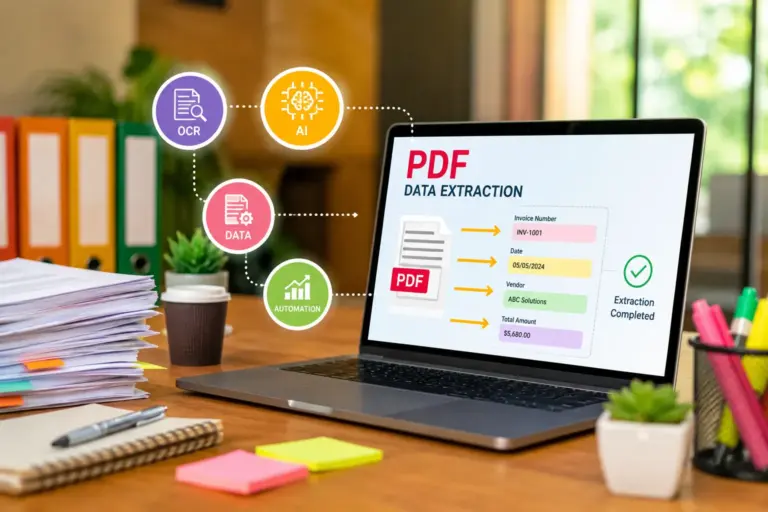
An AI receipt scanner is a software system that uses artificial intelligence, optical character recognition (OCR), and machine learning to extract financial data from receipts, invoices, and expense documents.
Instead of manually typing expense details, users simply:
- Upload a receipt image
- Scan a paper receipt with a mobile device
- Forward a digital receipt via email
- Sync purchases from payment systems
The software then automatically identifies and extracts information such as:
- Merchant name
- Date
- Tax amount
- Total spend
- Currency
- Expense category
- Payment method
- Line-item details
Modern AI bookkeeping tools go much further than basic OCR. They also classify transactions, detect duplicates, flag policy violations, and sync directly with accounting systems like:
- QuickBooks
- Xero
- SAP
- Oracle
- NetSuite
The result is a much faster and more accurate expense management workflow.
Why Traditional Expense Management Breaks at Scale
Manual expense tracking becomes expensive surprisingly quickly.
Most businesses underestimate how much time finance teams spend on:
- Verifying receipts
- Correcting employee submissions
- Matching transactions
- Chasing approvals
- Resolving reimbursement disputes
- Preparing audit documentation
In smaller organizations, these inefficiencies hide beneath the surface. But once transaction volume increases, the cracks become obvious.
A few common pain points include:
Lost or Incomplete Receipts
Paper receipts fade, get misplaced, or never reach accounting departments.
Human Data Entry Errors
Even experienced finance staff make mistakes during repetitive manual entry tasks.
Delayed Expense Approvals
Managers often review expense reports days or weeks after purchases occur.
Limited Spending Visibility
Without centralized automation, businesses struggle to identify spending trends in real time.
Compliance Risks
Missing documentation creates problems during audits, tax reporting, and regulatory reviews.
AI receipt scanner systems directly address these operational weaknesses.
How AI Receipt Scanning Works
The technology behind modern receipt OCR apps is much more sophisticated than many businesses realize.
OCR Technology Extracts Raw Text
Optical Character Recognition converts scanned images into machine-readable text.
For example, a photographed restaurant receipt becomes readable financial data rather than just an image file.
Older OCR systems struggled with:
- Crumpled receipts
- Poor lighting
- Handwritten text
- Foreign currencies
- Unusual receipt layouts
Modern AI models dramatically improve extraction accuracy by learning patterns across millions of receipt formats.
Machine Learning Classifies Expense Data
AI models identify contextual patterns within receipts.
The system understands that:
- Uber is transportation
- Marriott is lodging
- Starbucks is meals
- AWS charges belong to cloud infrastructure
Over time, many platforms learn organization-specific accounting rules automatically.
This becomes particularly valuable for enterprise operations teams managing thousands of transactions every month.
Data Validation Improves Accuracy
Advanced finance automation platforms also validate extracted information against:
- Corporate expense policies
- Credit card transaction feeds
- ERP systems
- Tax rules
- Vendor databases
This helps identify:
- Duplicate submissions
- Fraud risks
- Out-of-policy spending
- Currency inconsistencies
Accounting Integration Automates Bookkeeping
The biggest operational advantage comes from integration.
Modern AI bookkeeping tools connect directly with:
- Payroll systems
- ERP platforms
- AP automation software
- Corporate cards
- Tax management systems
- Procurement software
This reduces reconciliation work dramatically.
Instead of manually transferring expense data between systems, finance teams can automate the full workflow from receipt capture to ledger entry.
Key Features Modern Businesses Should Look For
Not all expense management software delivers the same level of automation.
Some tools simply scan receipts. Others function as full financial workflow orchestration systems.
Here are the capabilities that matter most.
Multi-Currency Support
Critical for global businesses managing international employee spending.
Mobile Receipt Capture
Employees should be able to upload receipts instantly from smartphones.
Real-Time Policy Enforcement
The software should automatically flag policy violations before approval.
ERP and Accounting Integrations
Direct integrations reduce reconciliation complexity.
AI-Based Categorization
Automated classification eliminates repetitive accounting tasks.
Audit Trails
Finance teams need searchable documentation for compliance and tax reporting.
Approval Workflow Automation
Routing approvals automatically saves enormous administrative time.
Fraud Detection
Advanced systems detect suspicious expense behavior patterns.
AI Receipt Scanners vs Traditional OCR Apps
Many businesses confuse basic OCR tools with intelligent expense automation systems.
The difference is significant.
| Feature | Basic OCR App | AI Receipt Scanner |
|---|---|---|
| Text extraction | Yes | Yes |
| Expense categorization | Limited | Advanced AI |
| Duplicate detection | Rare | Common |
| Policy enforcement | No | Yes |
| ERP integration | Basic | Extensive |
| Learning capabilities | None | Continuous |
| Fraud detection | No | Often included |
| Workflow automation | Minimal | Extensive |
Traditional OCR simply reads text.
AI receipt scanning platforms understand financial context.
That distinction matters for organizations handling high transaction volumes.
Benefits for SMBs, Finance Teams, and Enterprise Operations
Different organizations adopt AI receipt scanner software for different reasons.
SMB Owners Want Operational Simplicity
Small businesses often lack large accounting departments.
Automation helps owners:
- Reduce bookkeeping costs
- Improve cash flow visibility
- Simplify tax preparation
- Minimize reimbursement disputes
- Save administrative time
For lean companies, automation directly impacts operational efficiency.
Finance Teams Want Accuracy and Speed
Finance professionals care about:
- Faster month-end closing
- Better compliance
- Reduced reconciliation workload
- More accurate reporting
- Centralized expense visibility
AI-powered automated expense tracking reduces repetitive low-value work, allowing finance staff to focus on analysis and strategic planning.
Enterprise Operations Managers Want Scalability
Large organizations prioritize:
- Process standardization
- Multi-department governance
- Global policy enforcement
- ERP synchronization
- Spend analytics
- Audit readiness
At enterprise scale, even small workflow inefficiencies become expensive.
Real-World Expense Automation Workflows
The most effective finance automation platforms connect multiple systems into a unified workflow.
Employee Travel Expense Workflow
- Employee pays with corporate card
- Mobile app captures receipt instantly
- AI extracts expense data
- Expense categorized automatically
- Policy compliance checked in real time
- Manager receives approval request
- Approved transaction syncs to ERP
Without automation, this process may involve:
- Manual spreadsheets
- Email chains
- Paper documentation
- Duplicate data entry
Accounts Payable Workflow
Some AI receipt scanners also support invoice processing.
For example:
- Vendor invoice uploaded
- OCR extracts invoice fields
- AI validates against purchase orders
- Exceptions flagged automatically
- Approved invoice routed to payment system
This reduces AP processing delays significantly.
AI Receipt Scanning and Bookkeeping Automation
Bookkeeping automation is becoming one of the strongest adoption drivers.
Traditional bookkeeping workflows involve repetitive categorization and reconciliation tasks that consume huge amounts of staff time.
AI bookkeeping tools now automate:
- Expense categorization
- Ledger mapping
- Tax calculations
- Reimbursement tracking
- Transaction matching
- Vendor recognition
Some platforms even recommend accounting treatments based on historical behavior.
This is especially useful for businesses managing large recurring transaction volumes.
Security, Compliance, and Financial Data Protection
Financial data security is a major concern for enterprise buyers.
Expense management software providers now compete heavily on compliance capabilities.
Important considerations include:
Data Encryption
Both in transit and at rest.
Role-Based Access Controls
Finance leaders need granular permissions management.
Audit Logging
Every action should be traceable.
Regulatory Compliance
Depending on geography and industry, businesses may require:
- GDPR compliance
- SOC 2 certification
- ISO 27001 standards
- PCI DSS protections
Retention Policies
Businesses often need long-term storage for tax and audit purposes.
Common Problems Businesses Face During Implementation
Even strong finance automation platforms can fail if implementation is poorly planned.
Poor Policy Configuration
If expense rules are unclear, automation becomes inconsistent.
Employee Resistance
Staff may resist workflow changes initially.
Weak Integration Planning
Disconnected systems create duplicate workflows instead of reducing them.
Low-Quality Receipt Images
Blurry uploads reduce OCR accuracy.
Over-Automation
Some businesses automate processes before standardizing them.
That often creates operational confusion rather than efficiency.
How to Choose the Right Expense Management Software
Selecting the right platform depends heavily on organizational complexity.
SMBs Should Prioritize Simplicity
Look for:
- Easy onboarding
- Mobile usability
- Accounting integrations
- Transparent pricing
- Fast setup
Mid-Sized Companies Need Workflow Flexibility
Important capabilities include:
- Multi-step approvals
- Department controls
- Policy customization
- Corporate card integrations
Enterprises Need Deep Systems Integration
Enterprise buyers should evaluate:
- ERP compatibility
- Global compliance support
- Security certifications
- API access
- Procurement integrations
- Scalability under high transaction volume
Top Use Cases Across Industries
AI receipt scanner adoption spans far beyond finance departments.
Consulting Firms
Heavy travel and client reimbursement activity.
Construction Companies
Field teams submit expenses from remote job sites.
Healthcare Organizations
Complex procurement and compliance documentation.
Logistics and Transportation
Fuel receipts, mileage tracking, and fleet expenses.
Retail Chains
Multi-location operational spending.
Technology Companies
Recurring SaaS expenses and distributed employee teams.
ROI of Automated Expense Tracking
The financial impact of automation usually appears in four areas.
Reduced Administrative Labor
Finance teams spend less time on manual data entry.
Faster Reimbursements
Employees receive approvals and repayments more quickly.
Better Spend Visibility
Real-time dashboards improve budgeting decisions.
Lower Compliance Risk
Automated documentation reduces audit exposure.
For larger enterprises, these operational savings can become substantial over time.
Mistakes to Avoid When Adopting Finance Automation Platforms
Some implementations fail because businesses focus only on features instead of workflows.
Choosing Based Solely on OCR Accuracy
OCR matters, but integrations and workflow automation matter more long term.
Ignoring Employee Experience
Complicated interfaces reduce adoption rates.
Failing to Standardize Expense Policies
Automation performs best with clearly defined rules.
Overlooking Scalability
A platform suitable for a 20-person company may fail at enterprise scale.
Underestimating Change Management
Finance transformation affects multiple departments, not just accounting teams.
The Future of AI-Powered Expense Management
Expense management software is rapidly evolving into broader financial operations infrastructure.
Several trends are shaping the market.
Predictive Spend Analytics
AI systems increasingly forecast spending anomalies before they occur.
Conversational Finance Interfaces
Employees may soon submit expenses through chat-based assistants.
Autonomous Expense Processing
Some workflows will eventually require little or no manual approval.
Cross-System Financial Intelligence
Expense data will integrate more deeply with procurement, budgeting, and forecasting systems.
Real-Time Compliance Monitoring
AI models will continuously evaluate policy risk across transactions.
The gap between accounting software and intelligent finance operations platforms is shrinking quickly.
FAQ Section
What is the difference between a receipt OCR app and an AI receipt scanner?
A receipt OCR app mainly extracts text from images. An AI receipt scanner goes further by categorizing expenses, validating data, detecting fraud, and integrating with accounting systems.
Can AI receipt scanners integrate with accounting software?
Yes. Most modern expense management platforms integrate with accounting systems like QuickBooks, Xero, and enterprise ERP platforms.
Are AI bookkeeping tools accurate?
Accuracy depends on receipt quality, vendor formats, and the sophistication of the AI model. Leading platforms achieve very high extraction accuracy for common receipt types.
Is automated expense tracking secure?
Most enterprise-grade finance automation platforms use encryption, access controls, audit logging, and compliance certifications to protect financial data.
Do SMBs benefit from AI expense management tools?
Absolutely. SMBs often gain the most immediate value because automation reduces administrative workload without requiring large finance teams.
Can AI receipt scanners detect duplicate expenses?
Many advanced systems automatically identify duplicate submissions by comparing merchant names, dates, totals, and transaction patterns.
What industries use AI expense management software most heavily?
Consulting, construction, logistics, healthcare, retail, and technology sectors are among the largest adopters.
Conclusion
Expense management used to be an administrative necessity. Increasingly, it’s becoming a strategic automation layer inside modern financial operations.
AI receipt scanner platforms are helping organizations eliminate manual expense reporting, improve compliance, reduce reconciliation workload, and gain real-time visibility into operational spending.
For SMB owners, the value often starts with time savings and cleaner bookkeeping. For enterprise finance leaders, the bigger opportunity lies in scalable workflow automation, policy governance, and operational intelligence.
As finance automation platforms continue evolving, receipt scanning is no longer just about OCR. It’s becoming part of a much broader transformation in how businesses manage financial data, approvals, compliance, and operational efficiency.