AI Invoice Processing Software for Enterprises: How Modern AP Automation Reduces Costs, Errors, and Manual Finance Work
AI Invoice Processing Software for Enterprises
Enterprise finance teams are under pressure from every direction. Rising invoice volumes, global supplier networks, tighter compliance standards, and constant demands for faster reporting have turned accounts payable into one of the most operationally complex functions inside modern organizations.
Yet many enterprises still rely on fragmented invoice workflows built around email inboxes, PDFs, spreadsheets, shared drives, and manual approvals.
That’s where AI invoice processing software has changed the landscape.
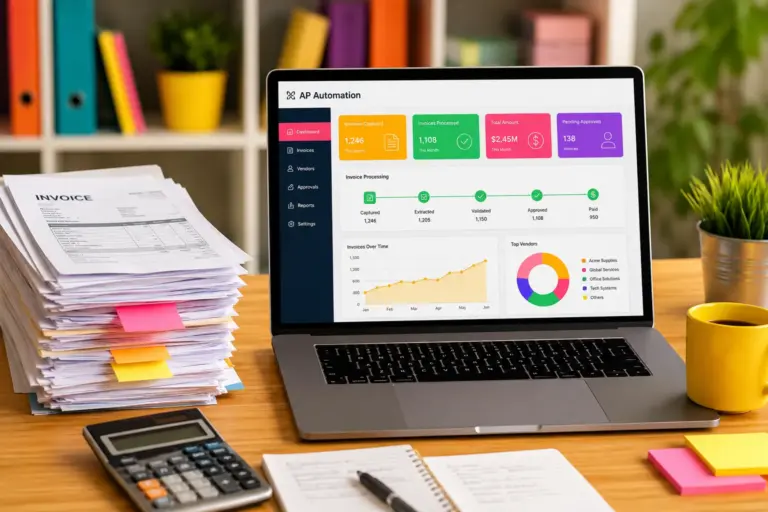
Modern AP automation platforms combine invoice OCR AI, intelligent document processing, machine learning, and workflow automation to transform how invoices move through enterprise finance systems. Instead of manually entering invoice data line by line, finance departments can automatically capture, classify, validate, route, approve, and reconcile invoices at scale.
For CFOs, the value goes far beyond efficiency.
AI-driven accounts payable automation helps reduce processing costs, improve cash flow visibility, strengthen audit readiness, prevent duplicate payments, accelerate vendor approvals, and free finance teams from repetitive administrative work.
The shift is especially important for enterprises handling:
- High invoice volumes
- Multi-entity accounting
- International vendors
- Complex approval chains
- ERP-heavy finance environments
- Shared services operations
- Compliance-sensitive workflows
As enterprise finance automation becomes more sophisticated, AP teams are evolving from transactional processing units into strategic financial operations functions.
What Is AI Invoice Processing Software?
AI invoice processing software is a category of enterprise finance technology that automates the extraction, validation, routing, and approval of invoice data using artificial intelligence and intelligent document processing.
Instead of relying solely on template-based OCR systems, modern AI platforms can:
- Read unstructured invoices
- Understand vendor formats
- Extract line-item data
- Detect anomalies
- Match invoices against purchase orders
- Learn from historical corrections
- Route approvals intelligently
The software typically integrates with ERP systems such as:
- SAP
- Oracle NetSuite
- Microsoft Dynamics 365
- Workday
- Sage Intacct
- QuickBooks Enterprise
In practical terms, the system acts like a digital accounts payable operator that continuously improves over time.
Why Traditional Accounts Payable Workflows Break at Enterprise Scale
Manual AP processes may function reasonably well for small businesses. Enterprise environments are different.
Once invoice volume grows into thousands or millions annually, operational bottlenecks become unavoidable.
Common Problems in Manual AP Environments
Data Entry Bottlenecks
Finance staff often spend hours manually typing:
- Invoice numbers
- Vendor details
- Tax values
- GL codes
- Payment terms
- Line-item descriptions
Manual entry creates:
- Delays
- Human error
- Rework
- Approval friction
Invoice Approval Delays
Invoices frequently get trapped inside:
- Email threads
- Regional approval chains
- Shared inboxes
- Paper-based signoffs
Delayed approvals can lead to:
- Late payment penalties
- Vendor disputes
- Lost early-payment discounts
Poor Visibility
Many finance teams lack real-time insight into:
- Outstanding liabilities
- Approval status
- Invoice aging
- Cash flow exposure
This becomes a major issue during:
- Quarter-end close
- Audits
- Budget forecasting
- Compliance reviews
Duplicate and Fraudulent Payments
Manual workflows increase exposure to:
- Duplicate invoices
- Fake vendor fraud
- Incorrect payment routing
- Unauthorized approvals
This risk grows significantly in decentralized finance operations.
Core Technologies Behind Modern AP Automation
Modern AI invoice processing software combines multiple technologies working together.
Invoice OCR AI
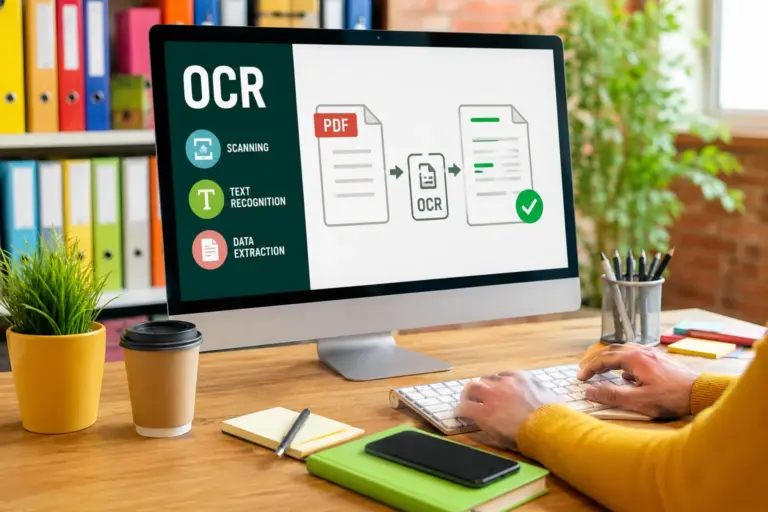
Optical Character Recognition converts invoice images and PDFs into machine-readable data.
Older OCR systems struggled with:
- Poor formatting
- Handwritten notes
- Complex layouts
- Multi-language invoices
Modern invoice OCR AI uses machine learning to improve extraction accuracy across highly variable document formats.
The system can identify:
- Vendor names
- Invoice totals
- Due dates
- Tax IDs
- Currency fields
- Line-item tables
Intelligent Document Processing
Intelligent document processing (IDP) extends beyond OCR.
Instead of simply reading text, IDP systems understand document context.
For example:
- Distinguishing invoices from receipts
- Recognizing vendor-specific structures
- Identifying missing fields
- Detecting inconsistent totals
- Mapping invoice data into ERP schemas
This dramatically reduces human intervention.
Machine Learning Models
Enterprise AP automation platforms continuously improve using historical invoice behavior.
Machine learning can:
- Predict coding patterns
- Recommend approvers
- Detect anomalies
- Identify fraud indicators
- Learn exception handling
Over time, automation rates increase as the system adapts to enterprise workflows.
Workflow Automation Engines
Workflow engines automate:
- Approval routing
- Escalations
- Notifications
- Compliance checks
- Payment authorization flows
This removes approval bottlenecks and standardizes finance operations.
ERP and Financial System Integration
Enterprise AP automation platforms must integrate deeply with:
- ERP systems
- Procurement platforms
- Vendor management systems
- Treasury systems
- Accounting software
Integration quality often determines implementation success.
How AI Invoice Processing Works Step by Step
Understanding the workflow helps finance leaders evaluate software vendors more effectively.
Step 1: Invoice Capture
Invoices enter the system through:
- Email ingestion
- Supplier portals
- EDI feeds
- Mobile uploads
- Scanned paper documents
- Shared folders
The software centralizes all invoice intake.
Step 2: OCR and Data Extraction
The AI engine extracts:
- Header fields
- Vendor information
- Payment terms
- PO references
- Tax data
- Line items
Advanced systems also validate extraction confidence scores.
Step 3: Intelligent Validation
The platform cross-checks invoice data against:
- Purchase orders
- Contracts
- Goods receipts
- Vendor master records
Exceptions are flagged automatically.
Step 4: GL Coding and Classification
AI models recommend:
- Cost centers
- Department mappings
- GL account codes
- Tax classifications
This significantly reduces accounting workload.
Step 5: Approval Routing
Invoices are automatically routed based on:
- Spend thresholds
- Business units
- Geographic regions
- Approval matrices
- Procurement policies
Step 6: Exception Handling
Finance staff review:
- Missing fields
- Mismatched totals
- Duplicate invoices
- Compliance flags
The system learns from corrections over time.
Step 7: ERP Posting and Payment
Approved invoices sync into the ERP for:
- Payment scheduling
- Reconciliation
- Financial reporting
- Audit tracking
Key Features Enterprises Should Prioritize
Not all AP automation software platforms are built for enterprise environments.
Multi-Entity Support
Large organizations need support for:
- Multiple subsidiaries
- Shared service centers
- Multi-currency accounting
- Global tax handling
Advanced Approval Logic
Enterprise approval structures are rarely simple.
The software should support:
- Conditional approvals
- Delegation rules
- Escalation paths
- Parallel approvals
ERP Connectivity
Strong ERP integration reduces implementation friction.
Look for native connectors to:
- SAP S/4HANA
- Oracle ERP Cloud
- NetSuite
- Workday Financials
- Dynamics 365
Fraud Detection Capabilities
AI-based anomaly detection helps identify:
- Duplicate payments
- Suspicious vendors
- Invoice manipulation
- Unusual payment behavior
Analytics and Reporting
Modern finance leaders require:
- Real-time dashboards
- Processing metrics
- Exception trends
- Supplier insights
- Working capital analysis
Business Benefits for CFOs and Finance Leaders
Lower Processing Costs
Manual invoice processing is expensive.
Enterprise studies consistently show that AI-powered AP automation reduces:
- Labor costs
- Processing time
- Reconciliation overhead
- Paper handling expenses
Faster Financial Close
Automation accelerates:
- Month-end close
- Accrual visibility
- Financial reconciliation
- Reporting accuracy
Better Cash Flow Management
Real-time AP visibility improves:
- Payment forecasting
- Liquidity planning
- Supplier negotiations
- Working capital optimization
Improved Vendor Relationships
Faster approvals and accurate payments reduce supplier friction.
This becomes especially important in:
- Manufacturing
- Logistics
- Retail supply chains
- Healthcare procurement
Reduced Compliance Risk
Audit trails and workflow controls strengthen:
- SOX compliance
- Internal controls
- Financial governance
- Regulatory reporting
AI Invoice Processing vs Traditional AP Automation
Traditional AP Automation
Older AP systems typically rely on:
- Static templates
- Basic OCR
- Rule-based workflows
These systems struggle with:
- Invoice variability
- Exception handling
- Complex vendor formats
AI-Powered AP Automation
Modern platforms add:
- Machine learning
- Adaptive extraction
- Predictive workflows
- Intelligent validation
The result is higher automation rates and lower manual intervention.
Enterprise Use Cases Across Industries
Manufacturing
Manufacturers process massive invoice volumes involving:
- Raw materials
- Freight
- Procurement
- International suppliers
AI automation improves:
- PO matching
- Inventory-linked approvals
- Vendor reconciliation
Healthcare
Healthcare organizations manage:
- Medical supplier invoices
- Insurance documentation
- Compliance-heavy procurement
AI systems reduce administrative complexity.
Retail
Retail finance teams benefit from:
- High-volume invoice automation
- Multi-location approvals
- Seasonal scaling
Logistics and Transportation
Transportation invoices often include:
- Fuel surcharges
- Freight variables
- Contract-based pricing
AI models help validate complex billing structures.
Financial Services
Banks and financial institutions prioritize:
- Auditability
- Fraud prevention
- Regulatory compliance
Enterprise-grade AP automation strengthens control frameworks.
Common AP Challenges AI Solves
Lost Invoices
Centralized ingestion eliminates scattered invoice handling.
Approval Delays
Automated routing accelerates cycle times.
Duplicate Payments
AI detection models identify duplicates before payment execution.
Vendor Disputes
Accurate processing improves supplier trust.
Limited Visibility
Dashboards provide real-time AP insights.
Implementation Strategy for Large Organizations
Enterprise AP automation requires careful rollout planning.
Start with Process Mapping
Document:
- Current workflows
- Approval structures
- Exception paths
- ERP dependencies
Clean Vendor Data
Poor master data reduces automation accuracy.
Standardize:
- Vendor records
- Tax information
- Payment terms
Pilot Before Enterprise Rollout
Start with:
- One business unit
- Limited invoice categories
- Controlled workflows
Then expand gradually.
Train Finance Teams
Adoption matters as much as technology.
Finance staff should understand:
- Exception handling
- AI confidence scoring
- Workflow monitoring
Integration with ERP and Finance Systems
ERP integration is often the most technically complex component.
Critical Integration Areas
Vendor Master Synchronization
Vendor data must stay aligned between systems.
Payment Status Updates
AP platforms should sync payment confirmations automatically.
GL Posting Logic
Accounting classifications must map correctly into ERP structures.
Procurement Integration
Integration with procurement systems improves three-way matching accuracy.
Security, Compliance, and Risk Management
Enterprise finance automation must meet strict security standards.
Key Security Requirements
Role-Based Access Control
Finance teams need granular permissions.
Audit Trails
Every invoice action should be traceable.
Data Encryption
Sensitive financial data requires encryption:
- In transit
- At rest
Regulatory Compliance
Depending on industry and geography, organizations may require:
- SOX compliance
- GDPR controls
- SOC 2 certification
- ISO 27001 standards
ROI and Cost Reduction Analysis
CFOs evaluating AI invoice processing software typically focus on measurable outcomes.
Direct Cost Savings
Automation reduces:
- Manual labor
- Invoice processing costs
- Exception handling effort
Operational Efficiency
Finance teams can process significantly more invoices without proportional headcount increases.
Early Payment Discounts
Faster approvals enable organizations to capture supplier incentives.
Reduced Error Costs
Duplicate payments and reconciliation mistakes decline substantially.
Strategic Finance Enablement
Automation allows finance staff to shift toward:
- Forecasting
- Analytics
- Vendor strategy
- Financial planning
Mistakes Enterprises Make When Choosing AP Automation Software
Focusing Only on OCR Accuracy
OCR matters, but workflow automation and ERP integration often matter more.
Ignoring Change Management
User adoption can determine project success or failure.
Underestimating Exception Handling
Complex invoices still require human review.
Strong exception workflows are critical.
Choosing SMB-Focused Platforms
Small business AP tools may lack:
- Scalability
- Compliance controls
- Enterprise integrations
Vendor Evaluation Checklist
When comparing enterprise AP automation platforms, evaluate:
- OCR accuracy
- ERP integrations
- AI learning capabilities
- Security certifications
- Multi-entity support
- Workflow flexibility
- Reporting depth
- Audit capabilities
- SLA guarantees
- Global compliance support
Request real invoice testing during vendor evaluations.
Future Trends in Enterprise Finance Automation
AI invoice processing is evolving rapidly.
Autonomous Finance Operations
Future systems will increasingly automate:
- Invoice decisions
- Exception handling
- Supplier communications
Predictive Cash Flow Intelligence
AI models will improve:
- Spend forecasting
- Payment timing optimization
- Working capital planning
Conversational Finance Interfaces
Finance users may interact with AP systems through:
- Natural language queries
- AI copilots
- Voice-based workflows
Expanded Intelligent Document Processing
IDP platforms are expanding into:
- Contracts
- Purchase orders
- Expense documents
- Compliance records
FAQ
What is AI invoice processing software?
AI invoice processing software automates invoice capture, extraction, validation, and approval using artificial intelligence, OCR, and workflow automation technologies.
How does invoice OCR AI work?
Invoice OCR AI converts invoice images and PDFs into structured data that finance systems can process automatically.
What is the difference between OCR and intelligent document processing?
OCR extracts text from documents. Intelligent document processing understands document context, validates data, and automates workflows.
Can AI invoice processing integrate with ERP systems?
Yes. Most enterprise AP automation platforms integrate with ERP systems such as SAP, Oracle, NetSuite, Workday, and Microsoft Dynamics.
Is AP automation suitable for global enterprises?
Yes. Enterprise-grade platforms support:
Multi-currency workflows
International tax handling
Multi-entity accounting
Global approval chains
How much can enterprises save with AP automation?
Savings vary, but enterprises often reduce invoice processing costs substantially through labor reduction, faster approvals, and fewer payment errors.
Does AI replace AP staff?
Typically, AI reduces repetitive manual work rather than replacing finance professionals entirely. Teams shift toward higher-value financial analysis and oversight.
What industries benefit most from AI invoice processing?
Industries with high invoice volumes and complex procurement workflows benefit significantly, including:
Manufacturing
Healthcare
Retail
Logistics
Financial services
Conclusion
AI invoice processing software has become a core component of enterprise finance modernization.
For CFOs and enterprise accounting teams, the opportunity extends beyond simple invoice digitization. Modern AP automation platforms improve operational efficiency, strengthen financial controls, enhance visibility, reduce risk, and support more strategic finance operations.
As intelligent document processing and machine learning technologies mature, enterprise finance departments are moving toward increasingly autonomous workflows that scale more effectively across global operations.
Organizations evaluating accounts payable automation should focus not only on OCR performance, but also on workflow intelligence, ERP integration depth, compliance capabilities, and long-term operational scalability.
The enterprises that modernize AP infrastructure early will likely gain measurable advantages in efficiency, cash flow management, and financial agility.